
Importing Interviews
This feature allows you to add interview transcripts to Academly for qualitative analysis and automatic coding.
What this section is about
Before you can code interviews, you need to import the transcript text. This feature stores your interview data and makes it available for the coding and analysis tools.
when you should use this
Import interviews when you:
• Have completed and transcribed interviews
• Want to use automatic coding features
• Need to organize interview data
• Are preparing for qualitative analysis
How it works
- Navigate to Qualitative > Interviews
- Add a new interview:Enter interview title
• Enter source (interviewee description)
• Paste the full transcript text (Only Speaker 2) - Click "Add Interview"
- Manage interviews:
• View full text by expanding
• Edit title, source, or text
• Delete interviews as needed - Prepare for coding:
• Interviews appear in Coding tool dropdown
• Select interviews for automatic coding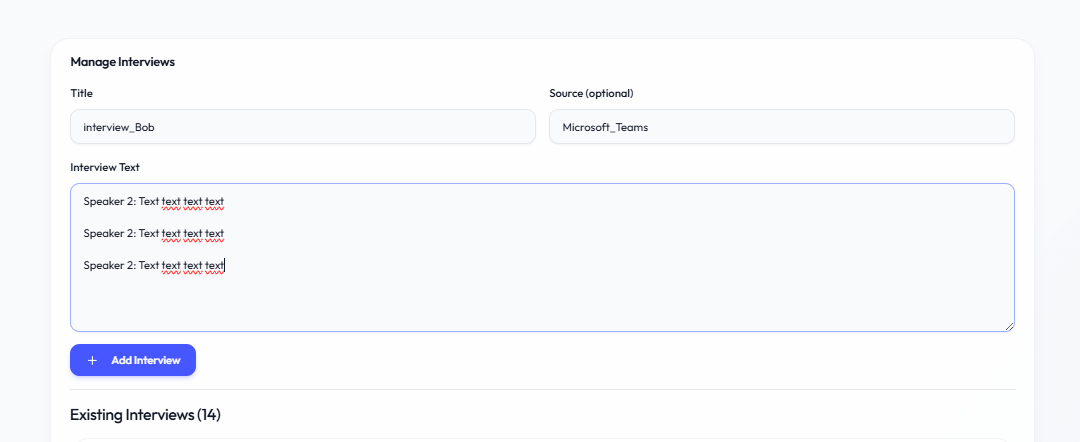
Important notes
• Use descriptive titles (e.g., "Participant_01_Manager")
• Remove personal identifiers before importing
• Transcription quality affects coding accuracy
• Backup transcripts before importing
No comments to display
No comments to display