
My Library
My Library is your central document repository and content management hub. It stores all your uploaded documents and generated content.
What this section is about
My Library provides organized access to everything you create in Academly: uploaded PDFs, generated summaries, theory paragraphs, methodology sections, and more. You can view, search, and manage all your academic materials in one place.
When you should use this
Visit My Library when you:
• Want to review your uploaded documents
• Need to find previously generated content
• Want to delete outdated materials
• Need to check document status
How it works
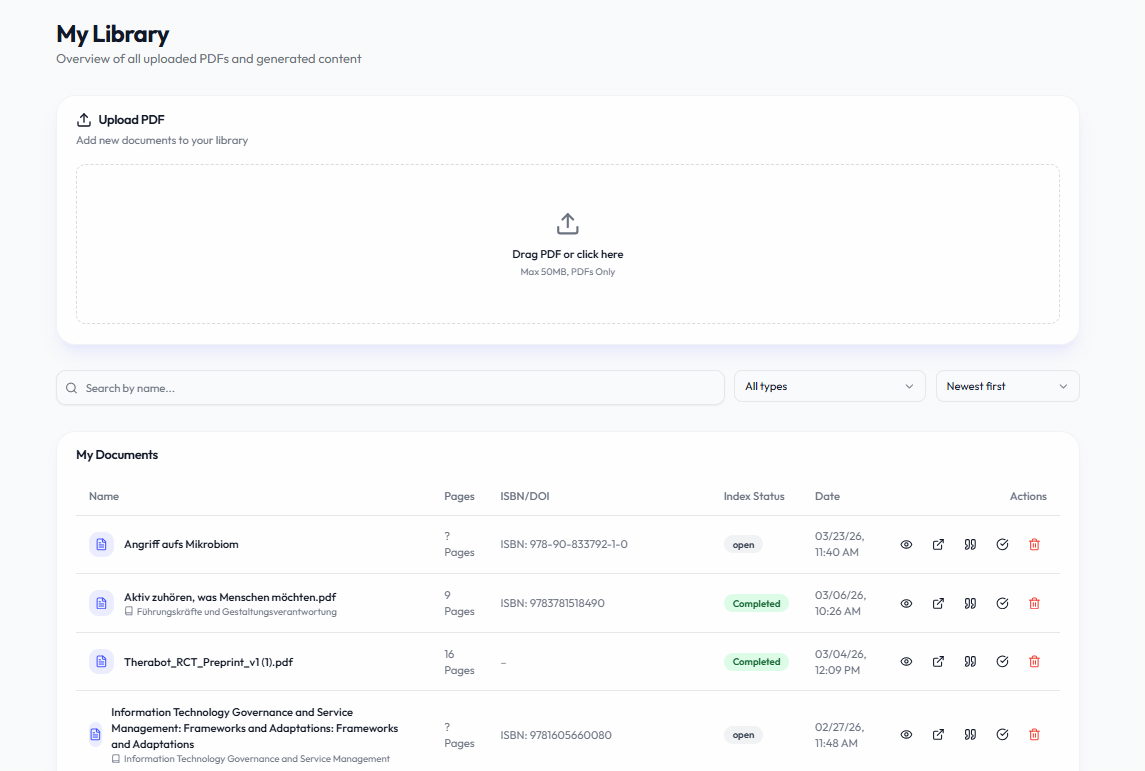
The library is organized into sections:
- My Documents
• All uploaded PDFs
• Status indicators (extracted/pending)
• Page counts and upload dates
• Actions: View, Delete - My Summaries
• AI-generated document summaries
• Source document reference
• Generation date
• Actions: View, Copy, Delete - My Theory & Background
• Generated theory paragraphs
• Topic and source information
• Actions: View, Copy, Delete - My Methods
• Generated methodology sections
• Actions: View, Copy, Delete - My Discussions
• Generated discussion chapters
• Actions: View, Copy, Delete - Each section includes:
• Pagination for large collections
• Quick actions (view, copy, delete)
• Date sorting
Important notes
• Deleting a document does not delete generated content based on it
• Generated content is saved automatically
• Use descriptive topics when generating for easy retrieval later
• Regular cleanup helps keep your library organized